
Azure Build Health
Internal Microsoft product that improves developer time and code quality.
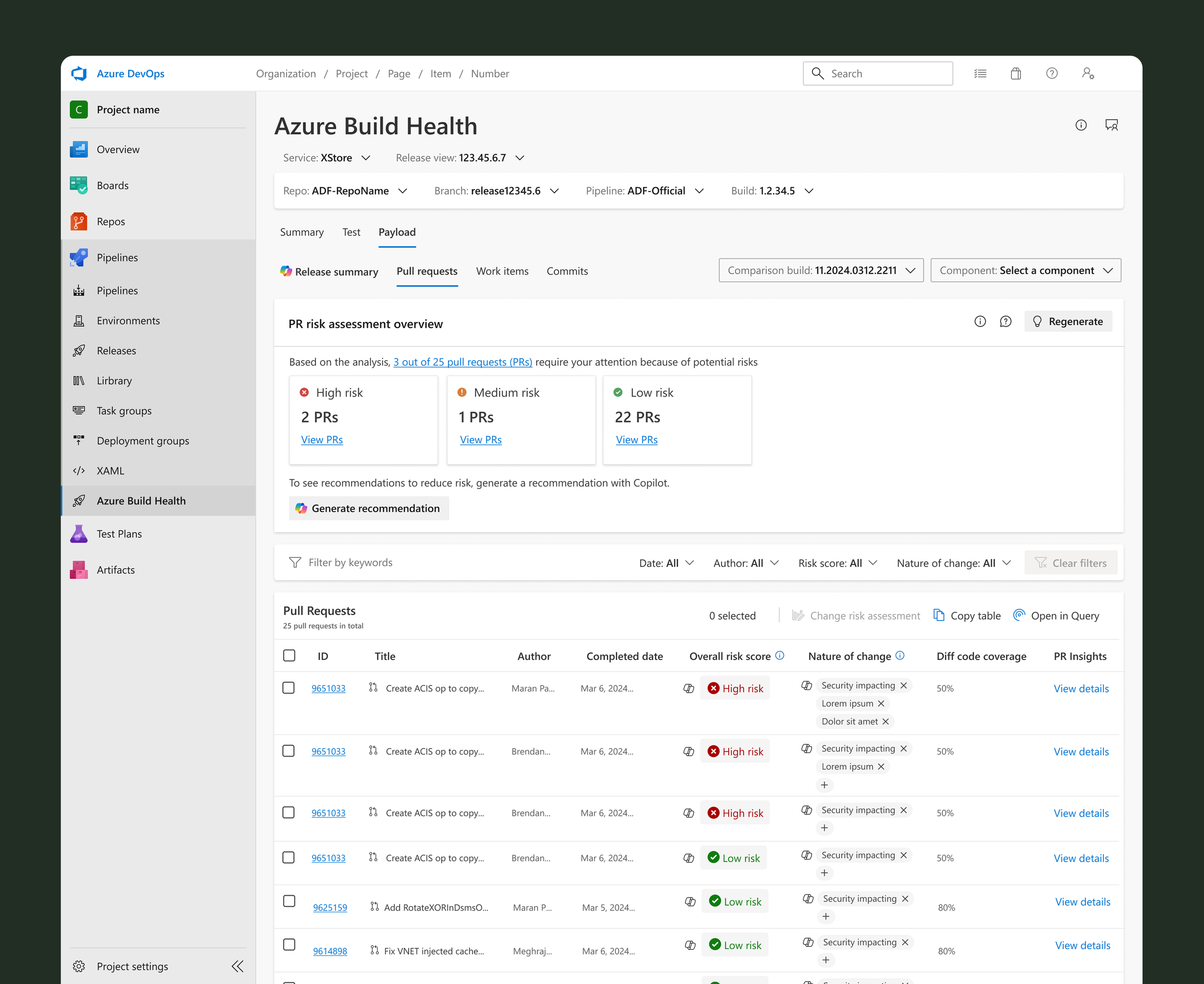
Azure Build Health’s Generative AI Risk and Summary
Role
Lead UX Designer
Team
Azure Build Health Developers, Product Managers, Copilot Developers, and Project Managers
About
I was the lead designer working alongside 2 cross functional teams. Together our focus was to leverage AI (Microsoft’s Copilot) to generate key insights for internal developers.
These set of features were the first attempt to integrate AI into an internal engineering system within Microsoft’s Azure.
There are two iterations of this case study. Iteration 1 will showcase the first attempt at introducing AI. Iteration 2 will illustrate updates made based on user research from Iteration 1’s release
Identifying the pains
Research
I conducted 8, 45-60 minute discovery interviews with our core users, Release Managers.
What we wanted to learn:
Understand the end-to-end of their release process
Capture insights on how long it takes to prepare for a release
Gather key pain points to find areas of opportunity for the team
“Every time we go to R2D, I go commit by commit, looking at the summary to get a sense of the risk, and with that risk then I try to get a measurement of the overall risk of a given release. And as you can imagine, this is a very time consuming, somewhat subjective manual process.”
I identified two major themes with three core user problems
Findings
01 Reduce time spent
Manual effort
Release Managers manually evaluate the intent and risk of every code change contained in release.
02 Provide Clarity
Lack of context
They have minimal context on each change and must rely on the PR owner to evaluate risk. This takes 4-5 days on average to track down all the details.
Lack of information
They do not have enough information to fully verify code quality before deployment. This gap in visibility allows defective or harmful code to reach customers, leading to service outages and security risks.
Accessing the design
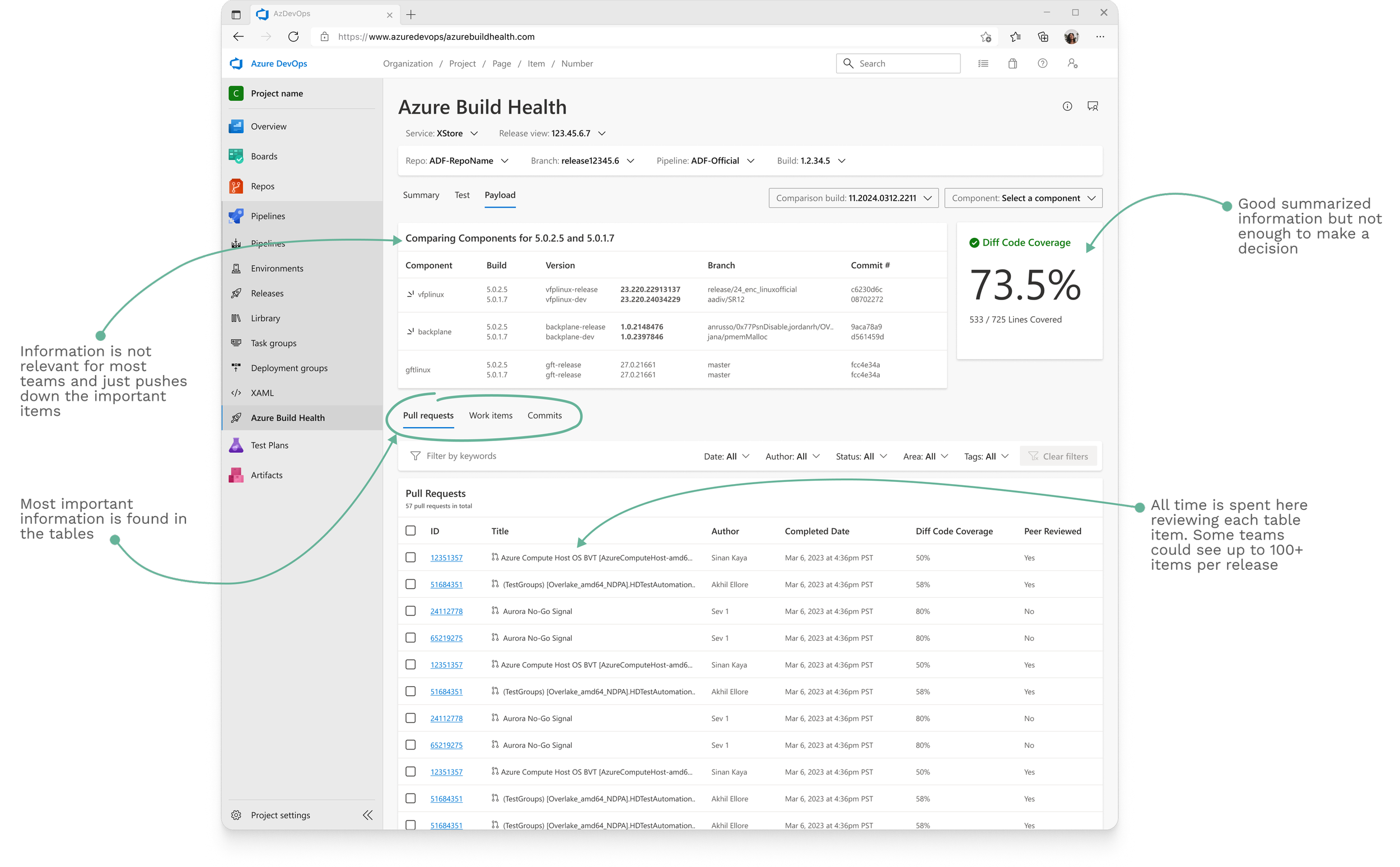
Why the payload tab?
We know that the Payload tab is where all the fine details are found for a release. This is where information is collected and made.
Design Process
Reducing manual toil
I designed a new section of the Payload tab that provides the Release Manager with a high level risk evaluation of a release payload.
Copilot would automatically generate a risk level based on the information in the release. A summary would get generated with next steps.
Evaluating risk
To give release managers more context for each PR, we added a detailed Copilot risk assessment. This reduced manual analysis of each PR, and had a side effect of reducing the time needed to evaluate it.
Giving control to our users
To help mitigate potential user anxiety over AI inaccuracies, I designed options for users to change AI generated content. Release Managers could change the risk generated for each payload and the overall release score. Changes were also fed back into Copilot to help train the models and improve generated content going forward.
Working with the team
This project required me to introduce a user-centered design process to an engineering team that had never worked with a designer. I successfully embedded UX methodologies into their workflow, shifting their focus from what to build to why we were building it.
After the project released, we held a postmortem on our new partnership. My contributions helped improve the teams UX maturity in the following ways:
Fostering Collaboration:
I facilitated a collaborative design process, creating consistent opportunities for my engineering partners to give input. This built team-wide alignment and ensured their valuable technical insights were integrated early.
User-Centricity:
I shifted the team's focus from internal assumptions to validated user needs. I involved engineers directly in user interviews and we built a document of pain points to ground our solution in real data.
Scope & Prioritization:
I worked to anchor all feature discussions to documented user pain points. This empowered the team to have productive trade-off conversations and successfully manage scope. It resulted in us focusing on the highest-impact work in the first iteration.
Iterative Validation:
I established a process of regularly validating designs early and often. This reduced the cost of changes and resulted in a higher quality product delivered on schedule.
Post deployment
Once the features were released we starting hearing from early adopters that copilot data had inaccuracies.
A study was planned to evaluate both the usefulness and usability of the copilot integration. This would be conducted by our user research team once they had bandwidth.
Measuring success
Reduce the time spent
Reduce time spent on assessing quality and code risk
Providing clarity
Users feel they have enough information to make informed decision